Are these the exact words?
The quotation is laid against the witness's whole answer. Added, dropped and changed words are marked. A dropped qualifier such as not
, I think
or I don't recall
is called out by name.
Quote and cite checker No AI in this tool
The checker answers that one question for every quotation in a brief. It compares word by word against the transcript as code read it. It runs on your computer and uses no model.
The two demo files, to run through the program yourself: deposition.txt and brief.docx.
The preview program is named Transcript Check (version 0.4.0, built 4 Nov 2026). It contains the quote and cite checker. The summary is switched off in this build, and the chronology screen is not in it. Results on this site dated after 4 Nov were measured on later code.
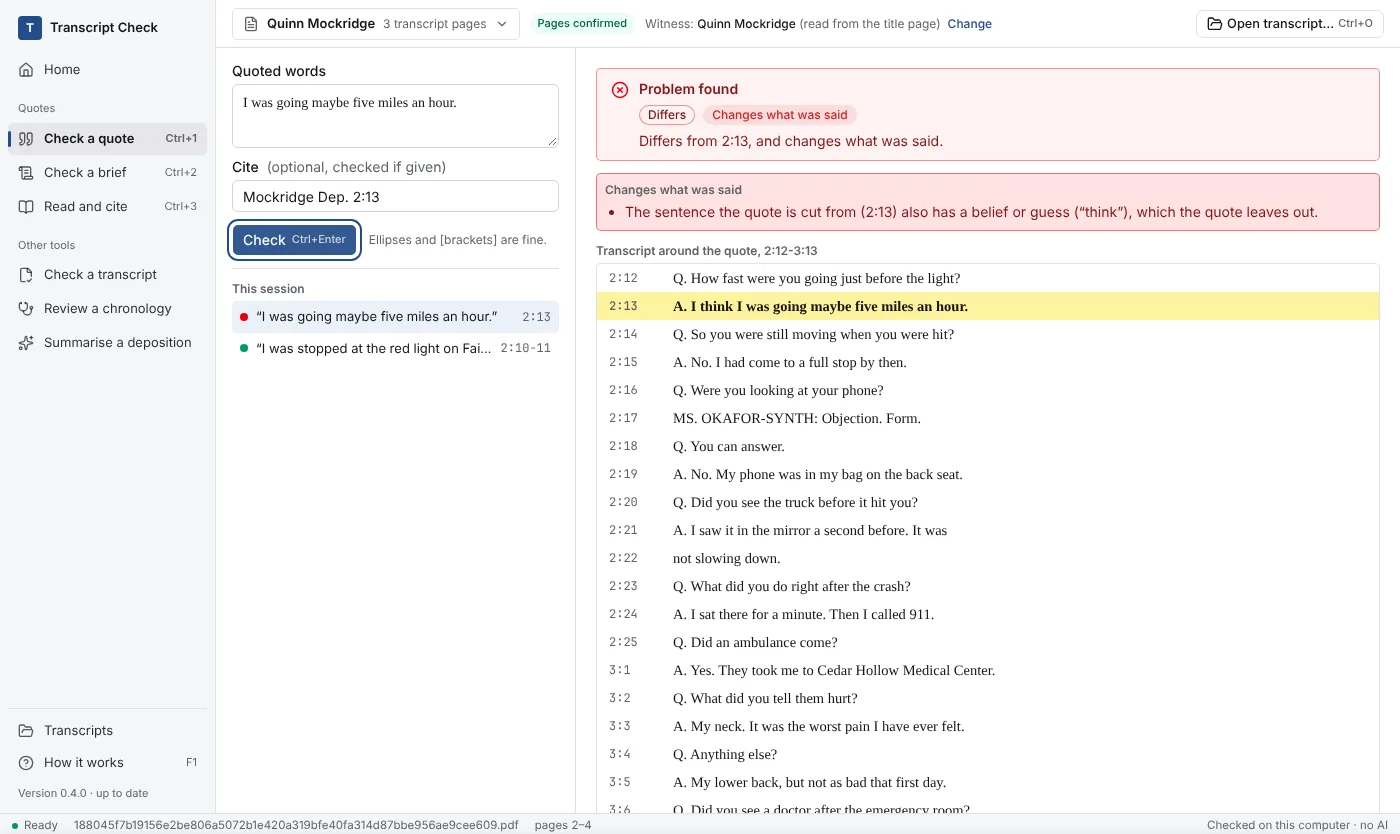
From the brief ¶ 5
The plaintiff testified to the speed before the light: I was going maybe five miles an hour.
Mockridge Dep. 2:13.
Problem found Differs Changes what was said
Every word that remains is in the transcript. The witness was less sure than the quotation makes it sound.
What is checked
The quotation is laid against the witness's whole answer. Added, dropped and changed words are marked. A dropped qualifier such as not
, I think
or I don't recall
is called out by name.
The cite is compared with where the words sit in the file. If the words are somewhere else, the checker gives the page and line where it found them.
Questions, objections, colloquy and anything an attorney or the reporter said are never the witness's testimony. Exact words from the wrong mouth are never shown as clean.
The verdicts
Green means one thing only. Earlier test rounds kept finding word-perfect quotations whose meaning changed because of what they left out, so every partial quotation is now amber, with the rest of the answer on screen.
| The screen says | Colour | What it means | Example |
|---|---|---|---|
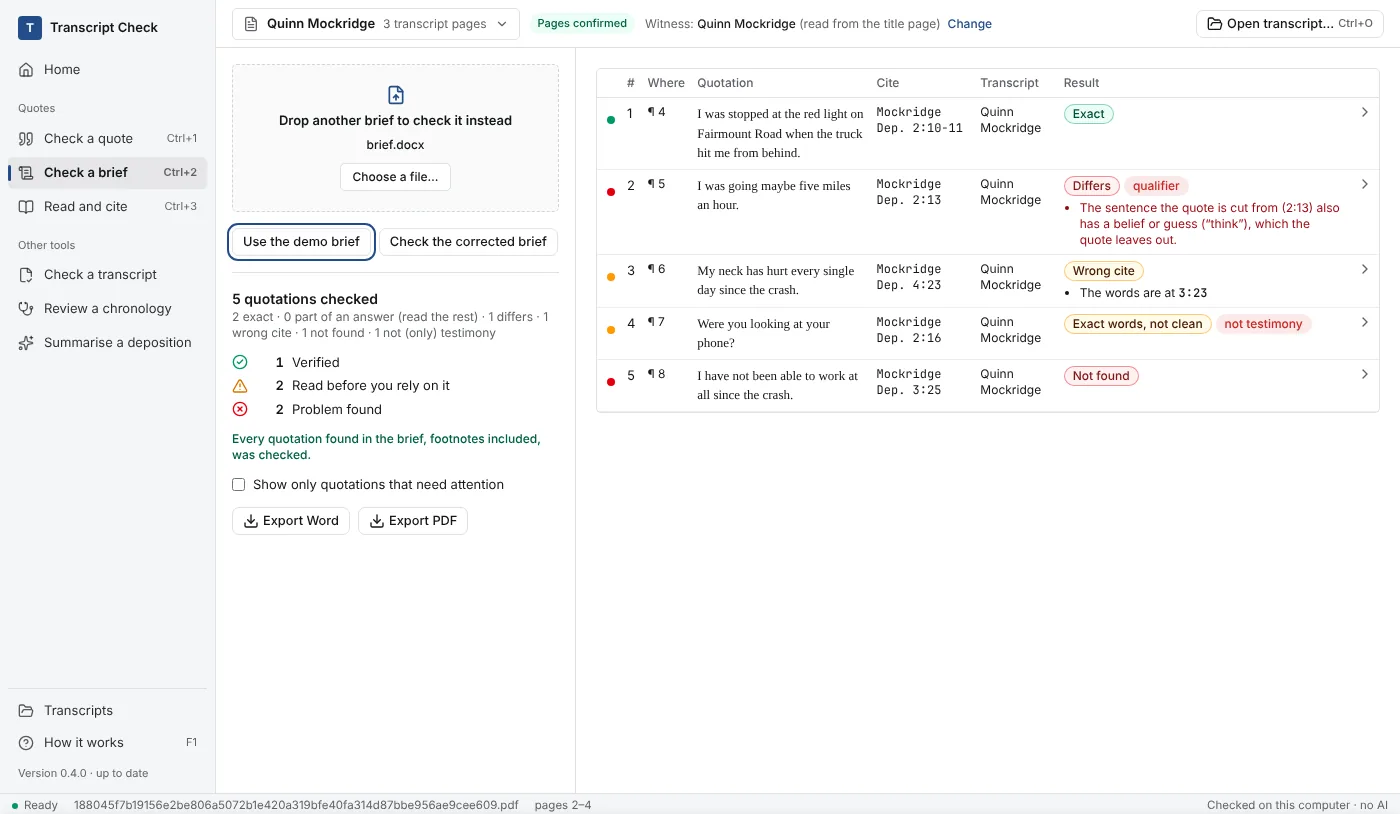
| Exact | Green Verified | The witness's whole answer, word for word, with the right cite. | Demo brief ¶ 4: the stopped-at-the-light answer at 2:10-11, quoted across a line break. |
| Part of an answer (read the rest) | Amber Read before you rely on it | The words, marks and cite are right, but the quotation is only part of what the witness answered. The rest of the answer is shown. | A quotation that keeps the second sentence of an answer and leaves out the first. |
| Whole answer, but read on | Amber | The whole answer, but something soon after takes it back or corrects it. | The witness says I misspokea few lines later. |
| Altered (read the notes) | Amber | Every word matches, but brackets change words. Each bracket is shown beside what it replaces. | [my]in place of their. |
| Wrong cite | Amber | The words are in the transcript, but not where the cite says. The right page and line are given. | Demo brief ¶ 6: cited to 4:23, found at 3:23. |
| Exact words, not clean | Amber | The words match, but the witness did not say them. | Demo brief ¶ 7: Were you looking at your phone?is counsel's question at 2:16. |
| Not a quote: compare with the record | Amber | The passage reads as a paraphrase. Compare it with the record. | A sentence typed without quotation marks that restates the testimony. |
| Differs | Red or amber | The closest passage, with added, dropped and changed words marked. Red when the change removes or adds a hedge, a denial or another qualifier. Amber when the words differ in another way, such as a changed number or name, or only capitals and punctuation. | Demo brief ¶ 5: I thinkleft out of the answer at 2:13. |
| Not found | Red Problem found | Nothing in the transcript is close enough. | Demo brief ¶ 8: I have not been able to work at all since the crash. |
Only differences that cannot change meaning: spacing, curly or straight quotation marks and dashes, a word hyphenated across a line break, a bracketed capital such as [t]he
, and an editorial note such as [sic]
. Ellipses and brackets are read as what they are.
It does not round up. An uncertain match is reported as different or not found, with the closest testimony beside it so you can read it yourself.
Step by step
Code reads every page and finds the printed page and line numbers. It lists the pages it leaves out and why. You confirm how the pages read before anything is checked.
One quotation and its cite, or a whole .docx. The brief is read in memory and is not written to disk.
Body text, tables, footnotes and endnotes are read. A quotation in a parenthetical belongs to the cite before it. Id.
takes the cite before it. A cite that names a witness is checked only against that witness's transcript.
Word by word, against the answer it comes from, and against who was speaking.
Every result shows the lines around the quotation. The quoted lines are highlighted and the rest of the answer is shaded.
Word or PDF. It lists each quotation, its verdict and the testimony it was checked against. Anything that was not checked, such as case law or an exhibit, is listed with the reason, so the counts add up.
 Open full size
 Open full size
Transcript layouts
Transcripts arrive in many shapes. The reader handles these, and names every page it leaves out.
One transcript page to a sheet, with a text layer. Court filing stamps are told apart from the printed page number.
Read through a working copy with one page per sheet. The copy is checked against the original before it is used.
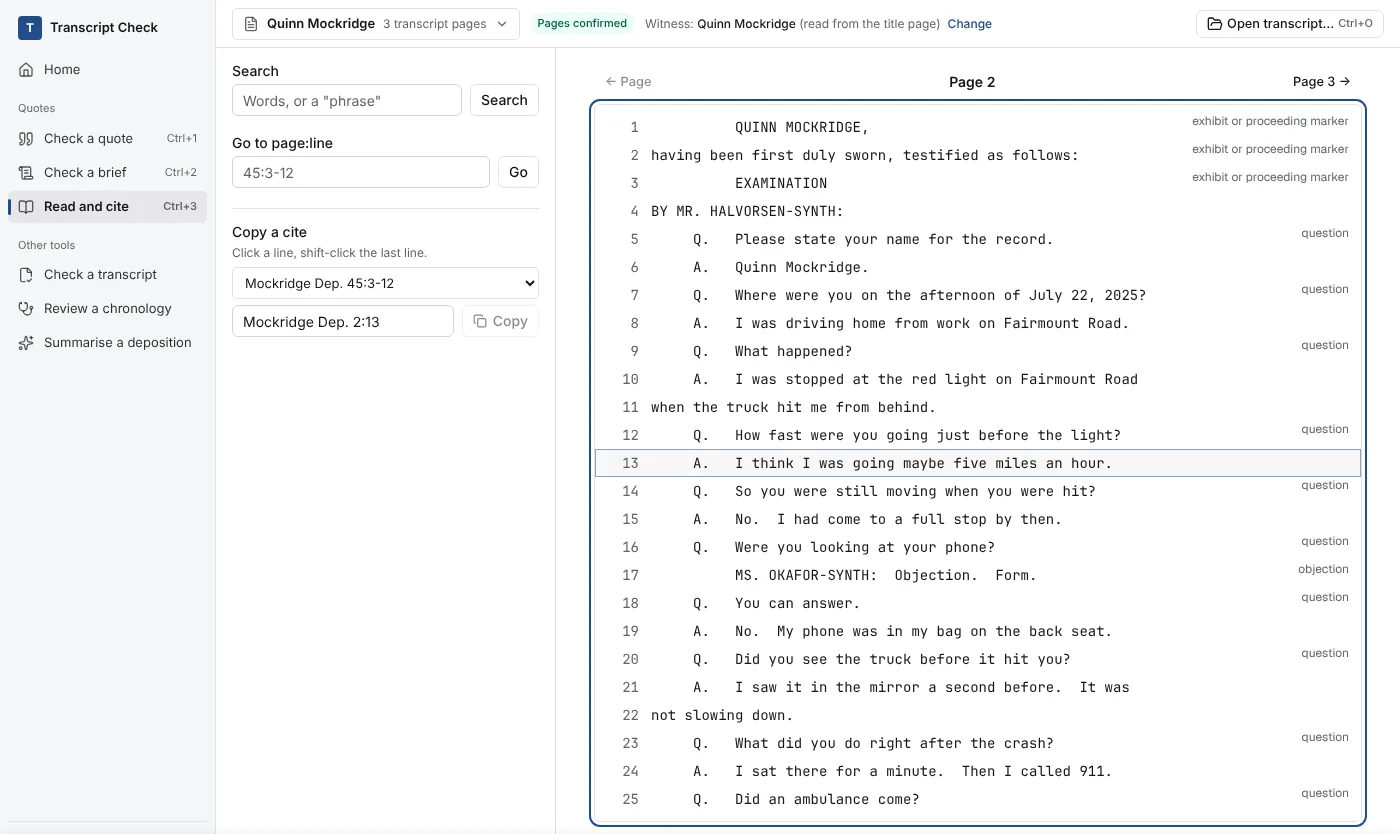
A reporter's text file with numbered lines and page breaks, read into a checked page copy. The demo deposition is one of these.
When the numbers were scanned and are not in the text, they are read by OCR on your computer and checked.
Caption pages, the reporter's certificate, errata and index sheets are not testimony. They are read, listed as left out with the reason, and never quietly dropped. In the demo deposition, pages 2 to 4 are testimony and the caption page and certificate are listed.
 Open full size
What it refuses to do
When a page cannot be read with certainty, it is left out and listed. The checker does not make up a cite.
Correct words cut from a longer answer are amber, with the rest of the answer shown.
I think I was going maybe five miles an hour.
A question quoted as if the witness said it is flagged, even when every word matches.
Q. Were you looking at your phone?
The check runs on your computer and uses no model. The status bar says so: checked on this computer, no AI.
Measured, in our own tests
A fresh set of public court-filed transcripts the tool had not seen, with defects planted in quotations and briefs. These are our own tests, not customer results.
Limits
The real checker runs in your browser on the invented deposition. Change a word and check again.